

MLflow Integration#
This notebook walks through a practical MLOps workflow with Darts’ native MLflow integration: enable autolog, compare forecasting models, promote the best one to the registry, and run inference from a production alias.
If you are new to Darts, see the Quickstart Guide first.
Prerequisites: install MLflow as an optional dependency:
pip install "mlflow>=3.0"
API reference: darts.utils.mlflow.
[1]:
%load_ext autoreload
%autoreload 2
[ ]:
import os
import tempfile
import warnings

import mlflow
import plotly
from mlflow import MlflowClient

import darts.metrics as metrics
from darts import set_option
from darts.datasets import AirPassengersDataset
from darts.models import ExponentialSmoothing, LinearRegressionModel
from darts.utils.mlflow import autolog, load_model

warnings.filterwarnings("ignore", category=FutureWarning)
set_option("plotting.use_darts_style", True)
plotly.offline.init_notebook_mode()

PLOTLY_KWARGS = dict(
    legend=dict(yanchor="top", y=0.99, xanchor="left", x=0.01),
)
1. MLflow setup#
Point MLflow at a tracking backend and create an experiment. We use a temporary directory so this notebook runs self-contained: run metadata goes to a SQLite database, and artifacts (models, JSON files) are stored alongside it. In production, set tracking_uri to your team’s MLflow server or local database.
[3]:
tmpdir = tempfile.mkdtemp()
mlflow_db = os.path.join(tmpdir, "mlflow.db")
artifact_root = os.path.join(tmpdir, "mlruns")

EXPERIMENT_NAME = "darts-mlflow-examples"
mlflow.set_tracking_uri(f"sqlite:///{mlflow_db}")
mlflow.set_experiment(
    experiment_id=mlflow.create_experiment(
        EXPERIMENT_NAME,
        artifact_location=artifact_root,
    )
)

print(f"Tracking URI: {mlflow.get_tracking_uri()}")
print(f"Experiment: {mlflow.get_experiment_by_name(EXPERIMENT_NAME).name}")
print(
    f"\nTo explore runs in the UI:\n  mlflow ui --backend-store-uri sqlite:///{mlflow_db}"
)
2026/09/04 14:03:54 INFO mlflow.store.db.utils: Creating initial MLflow database tables...
2026/09/04 14:03:54 INFO mlflow.store.db.utils: Updating database tables
Tracking URI: sqlite:////var/folders/4h/l09drklx06g8022q7khgyxyr0000gn/T/tmpjnang74m/mlflow.db
Experiment: darts-mlflow-examples

To explore runs in the UI:
  mlflow ui --backend-store-uri sqlite:////var/folders/4h/l09drklx06g8022q7khgyxyr0000gn/T/tmpjnang74m/mlflow.db
2. Load data#
We use the classic AirPassengers dataset. The last 36 months are held-out for evaluation using a rolling backtest.
[4]:
FORECAST_HORIZON = 12
BACKTEST_STRIDE = 12

series = AirPassengersDataset().load()
train, val = series[: -3 * FORECAST_HORIZON], series[-3 * FORECAST_HORIZON :]

print(f"Training: {len(train)} points | Validation: {len(val)} points")

fig = series.plotly()
fig.add_vline(
    x=train.end_time(),
    line_color="blue",
    line_dash="dash",
    annotation_text="Train / val split ",
    annotation_position="top left",
)
fig.update_layout(title="Air Passengers", **PLOTLY_KWARGS)
Training: 108 points | Validation: 36 points
3. Enable autolog#
One line turns on automatic experiment tracking for Darts models and metrics. We enable model logging (for the registry workflow) and backtest aggregate metrics (scalar backtest_agg_* keys for easy run comparison).
[5]:
autolog(log_models=True, log_backtest_aggregate=True)
What does autolog capture? (click to expand)
Trigger |
Logged automatically |
|---|---|
|
Model tags, hyperparameters, input series info, and trained model artifact when |
|
Same tags, hyperparameters, and series info as |
Standalone metric calls |
Time-aggregated scalar metrics (e.g. |
|
Windowed-, per-horizon-, or aggregated metrics prefixed with |
PyTorch models (NBEATS, TFT, …) |
Per-epoch |
Disable anytime with autolog(disable=True).
For manual logging, save/load APIs, and metric-key details, see the `Darts API reference <https://unit8co.github.io/darts/generated_api/darts.utils.mlflow.html>`__ and the `MLflow API reference <https://mlflow.org/docs/latest/ml/tracking/tracking-api/>`__.
4. Compare different model runs#
We run three distinct modelling approaches inside separate MLflow runs and compare them over the same evaluation period (backtest on rolling forecasts):
A pre-trained global
LinearRegressionModelthat we pre-train only on the train set (model.fit()) and use it to produce all rolling forecasts (retrain=False)A global
LinearRegressionModelthat we re-fit for every rolling forecast (retrain=True).A local
ExponentialSmoothingmodel that must be re-fit for every rolling forecast (retrain=True).
We score the generated forecasts using model.backtest():
Backtest with windowed
mae(reduction=None→ steppedbacktest_maechart + scalar aggregatebacktest_agg_mae).Backtest with time-dependent
err(per-horizon error profilebacktest_ae+ scalar aggregatebacktest_agg_ae).
[6]:
def run_experiment(name, model, pretrain, plot_historical=False):
    """Fit, evaluate, and autolog a single forecasting experiment."""
    hfc_kwargs = {
        "series": series,
        "start": val.start_time(),  # start time of the validation period
        "forecast_horizon": FORECAST_HORIZON,  # forecast horizon
        "stride": BACKTEST_STRIDE,  # step size between rolling forecasts
        "retrain": not pretrain,  # use pre-trained model or re-train for every forecast
        "last_points_only": False,  # use all available points for each forecast
    }

    with mlflow.start_run(run_name=name):
        # logs pre-trained model artifact
        if pretrain:
            model.fit(train)

        # logs model artifact if `retrain` is used
        hfcs = model.historical_forecasts(**hfc_kwargs)

        # windowed aggregate metric: stepped backtest_mae + scalar backtest_agg_mae
        # note: you can also pass multiple metrics to the `metric` argument (with dedicated `metric_kwargs`)
        bt_kwargs = {**hfc_kwargs, "historical_forecasts": hfcs, "reduction": None}
        model.backtest(metric=metrics.mae, **bt_kwargs)

        # time-dependent metric: per-horizon error `backtest_err` + scalar backtest_agg_err
        model.backtest(metric=metrics.err, **bt_kwargs)

        if plot_historical:
            fig = series.plotly(label="actual")
            for idx, hfc in enumerate(hfcs):
                fig = hfc.plotly(label=f"forecast {idx}", fig=fig)
            fig.update_layout(title=f"Historical forecasts — {name}", **PLOTLY_KWARGS)
            fig.show()

    return model
[7]:
run_configs = [
    {
        "name": "linear_regression_pretrained",
        "model": LinearRegressionModel(lags=12, output_chunk_length=FORECAST_HORIZON),
        "pretrain": True,
        "plot_historical": True,
    },
    {
        "name": "linear_regression",
        "model": LinearRegressionModel(lags=12, output_chunk_length=FORECAST_HORIZON),
        "pretrain": False,
        "plot_historical": False,
    },
    {
        "name": "exponential_smoothing",
        "model": ExponentialSmoothing(),
        "pretrain": False,
        "plot_historical": False,
    },
]

for run_config in run_configs:
    run_experiment(**run_config)
    print(f"Finished run: {run_config['name']}")
2026/09/04 14:03:56 WARNING mlflow.utils.environment: Failed to resolve installed pip version. ``pip`` will be added to conda.yaml environment spec without a version specifier.
2026/09/04 14:03:56 WARNING mlflow.utils.environment: Failed to resolve installed pip version. ``pip`` will be added to conda.yaml environment spec without a version specifier.
Finished run: linear_regression_pretrained
Finished run: linear_regression
2026/09/04 14:03:56 WARNING mlflow.utils.environment: Failed to resolve installed pip version. ``pip`` will be added to conda.yaml environment spec without a version specifier.
Finished run: exponential_smoothing
Disable Autologging#
You can turn off autologging at any time with the following line.
[8]:
autolog(disable=True)
Explore in the MLflow UI#
Open the tracking UI and compare runs side by side — model parameters, metrics, model artifacts are all available automatically.
[9]:
print(
    f"\nTo explore runs in the UI:\n  mlflow ui --backend-store-uri sqlite:///{mlflow_db}"
)
To explore runs in the UI:
  mlflow ui --backend-store-uri sqlite:////var/folders/4h/l09drklx06g8022q7khgyxyr0000gn/T/tmpjnang74m/mlflow.db
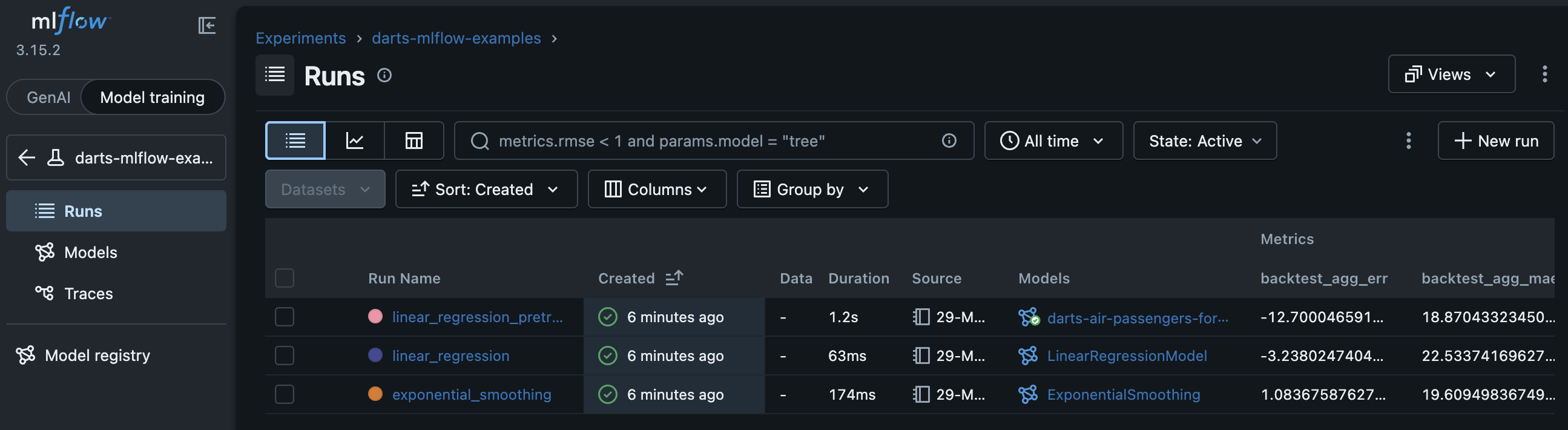
MLflow Runs Table View
The MLflow Runs Table shows all runs under an experiment in tabular style. It allows you to filter, sort, compare anything that was logged. You can add any logged parameter (metrics, model parameters, …) to the table via the Columns dropdown.
Here we see that:
linear_regression_pretrainedhad the lowest aggregated MAE (backtest_agg_mae).exponential_smoothinghad the lowest aggregated horizon-based bias (backtest_agg_err).
MLflow Runs Chart View
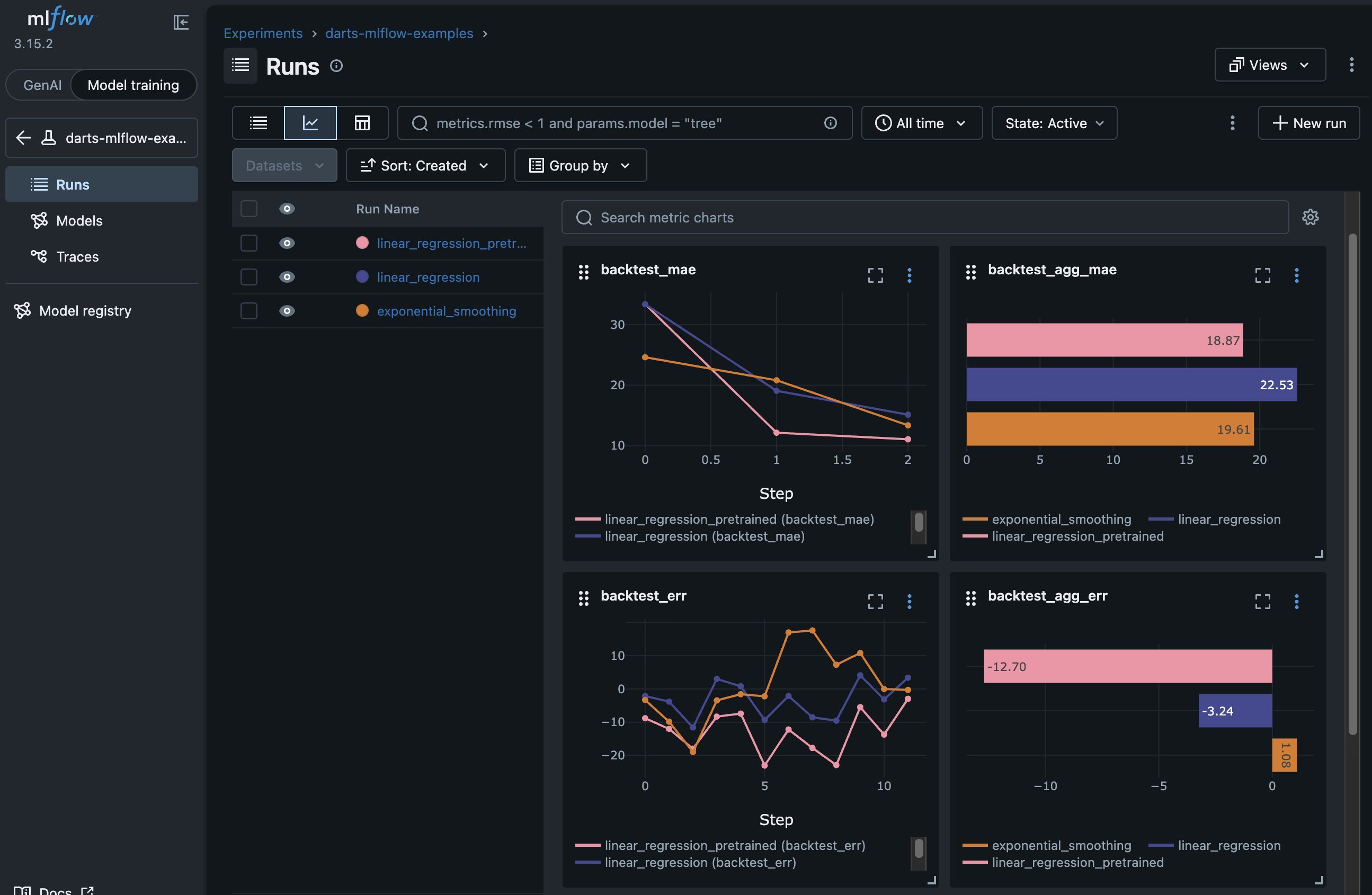
Click on the Chart View icon on the top left of the Runs Table to show a detailed view of all metrics across runs. In this view you can find scalar as well as stepped metric charts.
📈 Stepped metrics (line charts):
Windowed-backtest results for time-aggregated metrics - showing the score per rolling forecast (0, 1, … number of rolling windows - 1). See
backtest_maebelow showing 3 steps corresponding to the 3 rolling historical forecasts.Horizon-based-backtest results for time-dependent metrics - showing the score per step in the forecast horizon (0, 1, … horizon - 1) aggregated over all rolling forecasts. See
backtest_errbelow showing 12 steps corresponding toFORECAST_HORIZON.
📊 Scalar metrics (bar charts) for:
Aggregated backtest metrics, e.g. with
autolog(log_backtest_aggregate=True). Seebacktest_agg_maeandbacktest_agg_aebelow.Direct time-aggregated metric calls (e.g.
darts.metrics.mae())
… and many other configurations. Read more in the API reference.
MLflow Run Detail Page (click to expand)
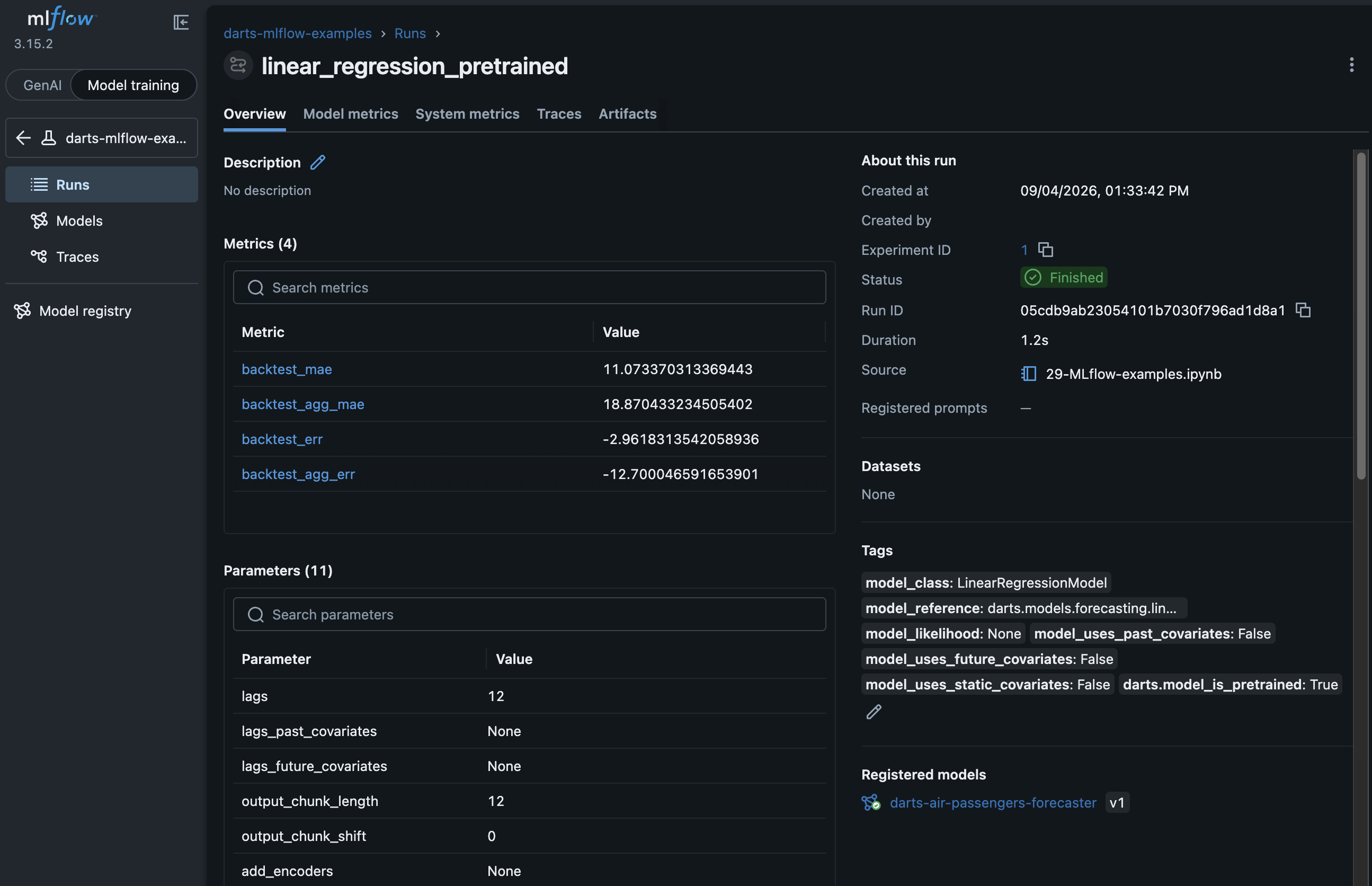
Click on any run in the Runs Table to open the Run Detail Page. It shows an overview of the run, its recorded metrics, hyper-parameters, input data information, tags, and more. Play around with the UI to see the different views and features.
Scroll down to the “Model” section and you will see the model that was logged during training. Click on the model to view the details (inclduing the logged model artifacts).
5. Find the best run#
Above, we could see that linear_regression_pretrained had the lowest MAE.
Let’s do this once programmatically. We want to find the model with the lowest overall MAE. With log_backtest_aggregate=True we get a convient sort key: one scalar that summarizes rolling backtest performance, regardless of how many windows or time series were evaluated. backtest_agg_mae is such a key.
[10]:
runs_df = mlflow.search_runs(
    experiment_names=[EXPERIMENT_NAME],
    order_by=["metrics.backtest_agg_mae ASC"],
)
display(runs_df[["run_id", "tags.mlflow.runName", "metrics.backtest_agg_mae"]])

best_run = runs_df.iloc[0]
best_run_id = best_run.run_id
best_run_name = best_run["tags.mlflow.runName"]
print(f"\nBest run by backtest_agg_mae: {best_run_name} ({best_run_id})")
| run_id | tags.mlflow.runName | metrics.backtest_agg_mae | |
|---|---|---|---|
| 0 | ee57c5714d6442ce93fbcf9899968842 | linear_regression_pretrained | 18.870433 |
| 1 | 0baa4c6c0e4d4ad5b7b53f5ae887ba02 | exponential_smoothing | 19.609498 |
| 2 | 8869add4ede74eebae1570acae7d82c6 | linear_regression | 22.533742 |
Best run by backtest_agg_mae: linear_regression_pretrained (ee57c5714d6442ce93fbcf9899968842)
6. Register the champion model#
We can promote the best run’s model to the MLflow Model Registry, then assign a champion alias (or any other alias). Downstream code can then load the registered models via registered model name and alias.
This assumes that model logging was enabled using
autolog(log_models=True):
runs that call
fit()within the run store a pre-trained modelruns that only use
historical_forecasts(retrain=True)store an untrained template (checkdarts.model_is_pretrainedon the run or model metadata).
[11]:
# Get the logged model URI of the best run
model_outputs = mlflow.get_run(best_run_id).outputs.model_outputs
best_model_uri = f"models:/{model_outputs[0].model_id}"
print(f"Best model URI: {best_model_uri}")

REGISTERED_MODEL_NAME = "darts-air-passengers-forecaster"

registration = mlflow.register_model(
    model_uri=best_model_uri,
    name=REGISTERED_MODEL_NAME,
)

client = MlflowClient()
client.set_registered_model_alias(
    REGISTERED_MODEL_NAME, "champion", registration.version
)
print("Aliases set: @champion")
Best model URI: models:/m-f25a0591479a43d085e31accbe45cc4a
Aliases set: @champion
Successfully registered model 'darts-air-passengers-forecaster'.
Created version '1' of model 'darts-air-passengers-forecaster'.
All logged models can be found in the MLflow Models View:
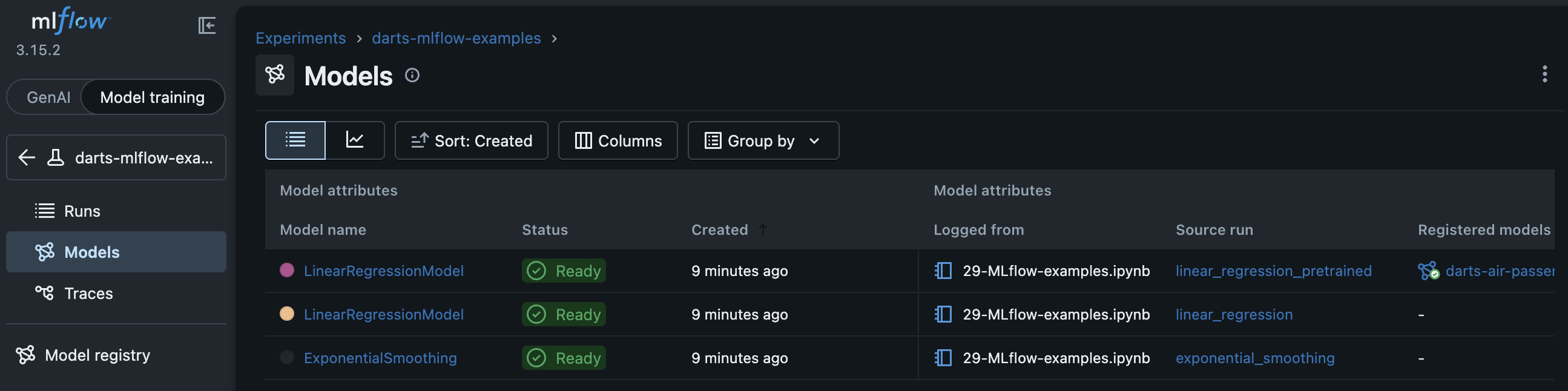
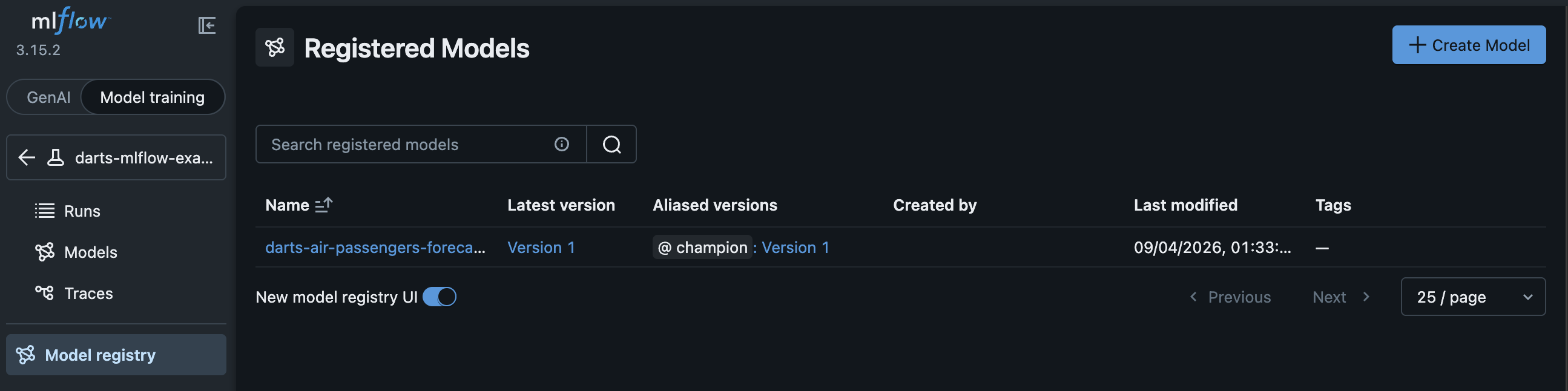
The registered models can be found in the MLflow Model Registry:
7. Load the champion and forecast#
Production inference loads the aliased registered model via models:/<name>@champion without hard-coding a version number. The loaded model can then be used for prediction.
We use model.historical_forecasts() with start="end" (instead of model.predict()) to produce the final forecasts because it also handles potential re-training for local and non-pre-trained models.
Always load Darts models with
from darts.utils.mlflow import load_model— notmlflow.pyfunc.load_model.
[12]:
champion = load_model(f"models:/{REGISTERED_MODEL_NAME}@champion")

forecast = champion.historical_forecasts(
    start="end",  # forward-looking forecast
    series=series,
    forecast_horizon=FORECAST_HORIZON,
    retrain=not champion._fit_called,
    last_points_only=False,
    overlap_end=True,
)[0]

fig = series.plotly(label="full series")
fig = forecast.plotly(label="champion forecast", fig=fig)
fig.update_layout(
    title=f"Production inference — {REGISTERED_MODEL_NAME}@champion", **PLOTLY_KWARGS
)
Summary#
In a few lines of code you get a complete experimentation loop:
Setup — tracking URI + experiment.
Autolog —
autolog(log_models=True, log_backtest_aggregate=True).Experiment —
with mlflow.start_run(): fit, historical forecasts, backtest metrics.Compare —
mlflow.search_runs(..., order_by=["metrics.backtest_agg_mae ASC"]).Promote —
register_model+set_registered_model_alias(..., "champion", ...).Serve —
load_model("models:/<name>@champion").predict(...).
Learn more: